The query that returned another company's payslips
An HR manager at Acme types "an" into the employee search of the payroll service her company rents. She is looking for Hanna. The list shows Hanna, Dana and Ivan, and below them Stefan, Joanna and Nathan, with their net pay for August. She has never heard of them. They work for Globex, another customer of the same service.
She takes a screenshot and calls her account manager.
The search endpoint was added eight months after the others, by a developer who had joined the month before. It was reviewed and tested, and it worked: the test environment has one tenant. The query looked for employees by name. It did not say whose employees.
For a payroll service this is a personal data breach. Under the GDPR the service, as Globex's processor, must tell Globex without undue delay. Globex then has 72 hours, where feasible, to notify the regulator, unless the breach is unlikely to put its employees at risk. And the service has two customers to explain itself to.
This article shows why "remember the tenant in every query" fails, what an EF Core global query filter fixes and where it stops, and how PostgreSQL row-level security keeps tenants apart when the application code gets it wrong. Examples use ASP.NET Core, EF Core and PostgreSQL.
The whole argument in 40 seconds.
The version everyone writes first
All tenants share one table, and every row says whose it is:
app.MapGet("/payslips", async (TenantContext tenant, AppDb db, CancellationToken ct) =>
    await db.Payslips
        .Where(p => p.TenantId == tenant.TenantId)
        .OrderBy(p => p.Employee)
        .ToListAsync(ct));
It is the cheapest way to run a multi-tenant product: one database, one schema, one deployment. The cost is that every query, in every endpoint, has to carry that Where.
In Aristophanes' Assemblywomen, Praxagora promises to turn Athens into a single dwelling, so that anyone can walk from one house into any other. A shared table is that city. The walls between households exist only where somebody remembered to write one.
Why it fails
The search that leaked:
app.MapGet("/payslips/search", async (string employee, AppDb db, CancellationToken ct) =>
    await db.Payslips
        .Where(p => EF.Functions.ILike(p.Employee, $"%{employee}%"))
        .OrderBy(p => p.Employee)
        .ToListAsync(ct));
Nothing about this code is unusual, which is the problem. The rule "filter by tenant" lives in the developers' memory and is checked by nothing:
- The compiler sees a valid query.
- The tests pass, because test data rarely has a second tenant, and a test that does has to be written for every endpoint.
- The reviewer sees a search by name and approves a search by name.
- Production returns 200.
A rule that has to be applied in a hundred places will be missed in one of them. The first improvement is to apply it in one place.
The first layer: a global query filter
EF Core can add the condition to every query on an entity:
public sealed class AppDb(DbContextOptions<AppDb> options, TenantContext tenant) : DbContext(options)
{
    public Guid? CurrentTenant => tenant.TenantId;

    protected override void OnModelCreating(ModelBuilder b)
    {
        b.Entity<Payslip>().HasQueryFilter(p => p.TenantId == CurrentTenant);
    }
}
Now the search needs no tenant in it. EF Core adds WHERE tenant_id = @tenant to every LINQ query on Payslips, including the ones nobody has written yet. This is a real improvement, and for many teams it is where the work stops.
It should not stop there, because the filter is a feature of EF Core's query pipeline, and data is reached in other ways:
| Path | Does the filter apply? |
|---|---|
A LINQ query on the DbSet, or FromSql on it |
Yes |
Database.SqlQuery<T> with hand-written SQL |
No |
IgnoreQueryFilters(), added for an admin screen and copied later |
No |
| An insert or update with another tenant's id | No, the filter only reads |
| Dapper, a reporting tool or a script on the same database | No |
| A background job, where there is no request and no tenant | The filter compares with NULL; raw SQL returns everything |
At the door of Trimalchio's house, in Petronius, a huge chained dog is painted on the wall above the words CAVE CANEM, beware of the dog, and the narrator is so startled that he nearly falls over. A query filter is that painting. It stops everyone who comes in through the front door and looks at the wall.
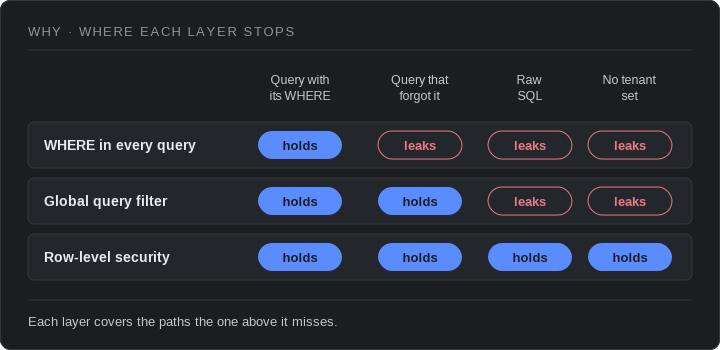
The second layer: let the database refuse
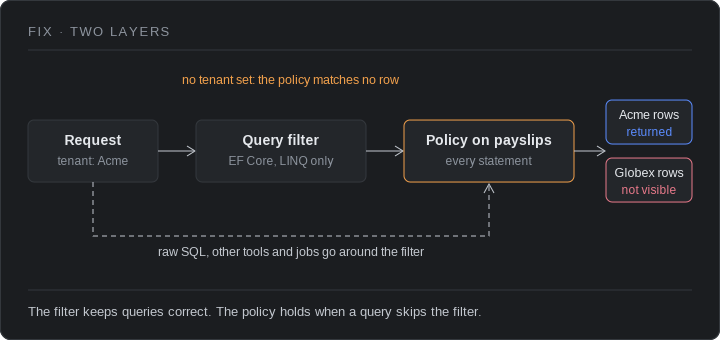
PostgreSQL can attach the condition to the table itself. It then applies to every statement from every client, whatever wrote the SQL. This is row-level security, and it has four parts.
1. A login that owns nothing
CREATE ROLE payroll_api LOGIN PASSWORD '...';
GRANT SELECT, INSERT, UPDATE, DELETE ON payslips TO payroll_api;
Policies do not apply to superusers, and by default they do not apply to the table's owner either. An application that connects as the user that created the tables is exempt from every policy on them. So migrations run as the owner, and the API connects as a second role that owns nothing.
2. A policy on the table
ALTER TABLE payslips ENABLE ROW LEVEL SECURITY;

CREATE POLICY payslips_same_tenant ON payslips TO payroll_api
    USING (tenant_id = NULLIF(current_setting('app.current_tenant', true), '')::uuid)
    WITH CHECK (tenant_id = NULLIF(current_setting('app.current_tenant', true), '')::uuid);
USING decides which rows a statement can see. WITH CHECK decides which rows it may write. Both compare the row's tenant with a setting on the connection.
3. The tenant, set on every connection
public sealed class TenantConnectionInterceptor(TenantContext tenant) : DbConnectionInterceptor
{
    public override async Task ConnectionOpenedAsync(
        DbConnection connection, ConnectionEndEventData eventData, CancellationToken cancellationToken = default)
    {
        await using var command = connection.CreateCommand();
        command.CommandText = "SELECT set_config('app.current_tenant', @tenant, false)";
        var parameter = command.CreateParameter();
        parameter.ParameterName = "tenant";
        parameter.Value = tenant.TenantId?.ToString() ?? "";
        command.Parameters.Add(parameter);
        await command.ExecuteNonQueryAsync(cancellationToken);
    }
}
EF Core calls the interceptor each time it opens a connection. The value is set every time, including to "no tenant", so a pooled connection never carries the previous request's tenant.
The policy trusts this value. It protects against a query that forgets the tenant. It does not protect against code that sets the wrong tenant, or against SQL injected through the API's own login, which can call set_config like any other statement. So the tenant has to come from the authenticated user, never from something the client is free to choose.
4. No tenant means no rows
With no tenant, the setting is an empty string, NULLIF turns it into NULL, and tenant_id = NULL is true for no row. A job that forgets to say whom it works for reads nothing and can write nothing. The failure is an empty report, which somebody notices. It is not a report with every customer's data in it.
Keep the query filter as well. Josephus describes the inner court of the Temple in Jerusalem as surrounded by a stone partition, with pillars on it at equal distances that announced, some in Greek and some in Roman letters, that no foreigner might go further. There was a notice and there was a wall. The filter is the notice: it keeps honest queries correct and readable. The policy is the wall.
What the sample counts
The companion sample has all three variants over the same table: two tenants, three payslips each. Every request is made as Acme.
| Request | WHERE in every query |
Query filter | Filter and row-level security |
|---|---|---|---|
| List payslips | 3 rows, 0 leaked | 3 rows, 0 leaked | 3 rows, 0 leaked |
| Search by name | 6 rows, 3 leaked | 3 rows, 0 leaked | 3 rows, 0 leaked |
| A report in raw SQL | 6 rows, 3 leaked | 3 rows, 0 leaked | |
| Insert a row for Globex | 201, row planted | 403, refused | |
| The raw SQL with no tenant | 7 rows, 2 tenants | 0 rows |
The code in the last two columns is the same. Only the database login differs.
What row-level security asks of you
- Two database roles. One owns the schema and runs migrations. The other serves requests. If the application connects as the owner, the policies do nothing and nothing warns you.
- A policy on every tenant-owned table. A new table without one is unprotected. The sample has a query that lists every table with a
tenant_idcolumn and no row-level security; run it as a test, so the build fails when someone adds such a table. - Care with connection pooling. Setting the tenant when a connection is opened is safe with the driver's own pool. Behind a pooler in transaction mode, such as PgBouncer, consecutive transactions of one session may run on different server connections, so set the tenant inside each transaction with
set_config(..., true). - The tenant has to come from something the caller can't choose. The sample reads a header to stay small. A real API reads a claim from a validated token.
- An index that starts with
tenant_id. The policy is a filter on every statement, and the planner needs an index to serve it. - Views and functions. A view runs with its owner's rights unless it is created with
security_invoker, so a view owned by the schema owner goes around the policy. - A way for support to look across tenants. That is a separate role with
BYPASSRLS, used by a separate tool, and every use of it is logged.
When you don't need it
| Situation | Smaller answer |
|---|---|
| Each tenant has its own database or schema | Isolation comes from the connection; there is no shared table to filter |
| The product is installed once per customer | There is one tenant |
| The shared tables hold nothing confidential, such as a public catalogue | A query filter, for correctness |
| A few large customers, each with contract terms about isolation | A database per tenant is often easier to explain to their auditors |
Reach for row-level security when tenants share tables and a row shown to the wrong one is an incident, which is the case for personal, financial and health data.
The rule
- A rule that every query must remember will be forgotten by one. Put tenant isolation where a query can't forget it.
- Use two layers. A query filter keeps the application's queries correct; a database policy holds when a query doesn't go through the filter.
- Fail closed. With no tenant set, the answer is no rows, never all rows.
Run it yourself
The companion sample is a minimal ASP.NET Core API that runs entirely in Docker, next to PostgreSQL. A small client sends Acme's tenant header, calls every endpoint and counts the rows that belong to Globex.
docker compose up -d --builddocker compose run --rm demoThe output on my machine:
Two tenants, Acme and Globex, with 3 payslips each. Every request below is made as Acme.

1. A WHERE clause in every query
   GET  /manual/payslips             3 row(s), 0 from another tenant
   GET  /manual/payslips/search      6 row(s), 3 from another tenant   <- this query forgot the WHERE

2. An EF Core global query filter
   GET  /filtered/payslips           3 row(s), 0 from another tenant
   GET  /filtered/payslips/search    3 row(s), 0 from another tenant
   GET  /filtered/payslips/highest   6 row(s), 3 from another tenant   <- raw SQL does not go through the filter

3. The same code on a database login with row-level security
   GET  /rls/payslips                3 row(s), 0 from another tenant
   GET  /rls/payslips/search         3 row(s), 0 from another tenant
   GET  /rls/payslips/highest        3 row(s), 0 from another tenant   <- the same raw SQL

4. A write that names another tenant (the body says Globex)
   POST /rls/payslips                403   <- the database refused the row
   POST /filtered/payslips           201   <- a payslip planted in Globex

5. No tenant at all, as in a background job
   GET  /filtered/payslips/highest   7 row(s) from 2 tenant(s)   <- every tenant's rows
   GET  /rls/payslips/highest        0 row(s) from 0 tenant(s)   <- nothing: no tenant, no rows

6. Tables with a tenant_id column and no row-level security: leave_requests
Step 6 is the check that should run in your build. The sample contains a table without a policy, leave_requests, so that the check has something to find.
The demo has limits. The tenant comes from an X-Tenant header, not from a token. The POST endpoints accept a tenant id in the body on purpose, to show what each layer does with it. Views, a BYPASSRLS role for support and the cost of policies on large tables are described above but not shown.
Further reading
- PostgreSQL: row security policies
- PostgreSQL: CREATE POLICY
- EF Core: global query filters
- EF Core: interceptors
- GDPR, Article 33: notification of a personal data breach
This article is part of Justified Complexity: Building Backends One Decision at a Time.
Updated 2026-11-12, after a review: the GDPR sentence now says who notifies whom (the service tells its customer without undue delay; the customer has 72 hours, where feasible, to notify the regulator); added that the policy trusts the tenant value the application sets, so it guards against a forgotten filter and not against a wrong tenant or injected SQL. The sample's demo client now reports a failed request instead of counting it as no rows.